Documenting Packages
Qilletni features a custom documentation generator tailored to the languages' needs. Official Qilletni packages are documented and hosted at https://docs.qilletni.dev/.
The Documentation Generator
The documentation generator is accessed from the qilletni doc command. The generator creates a full static website from either a project's source, or from an existing Qilletni Library (.qll) file. This static website may host multiple packages' documentation, with an index page updated automatically.
Info
The generator currently only supports single package scopes across a single deployment directory.
Using The Generator
Generating documentation is straightforward. Run qilletni doc in the project's root directory, using the -o param to specify the output directory, with the target qilletni_src directory or .qll file following.
For instance, if you are in a project's root, to generate documentation into the docs directory, run:
To specify a cache directory (see the below section on stateful generation), use the -c param:
The default cache directory is .qilletni/cache.
To regenerate all packages' documentation in the cache, use the -r parameter:
Stateful Generation
The Qilletni documentation generator is unique in the fact it allows for cross-referencing libraries in the case of extension functions. For instance, take a package A and B. B defined an entity, which its own generated page, showing functions. If A defines a function that extends that entity, then the function will be documented both in A, and the type defined in B. This leaves out any guesswork of what's available on an entity when using multiple libraries at once.
This is implemented by storing information about each docstring in a cache file, named <package-name>.cache in ~/.qilletni/cache (or wherever else specified). When generating documentation for a package, if it has an extension function on another package's entity, it will look for that package in the cache and update it to include the function. Then, the documentation is regenerated for that package as well.
Generated Documentation Features
Aside from cross-package referencing, the documentation generator supports some more advanced features:
Searching
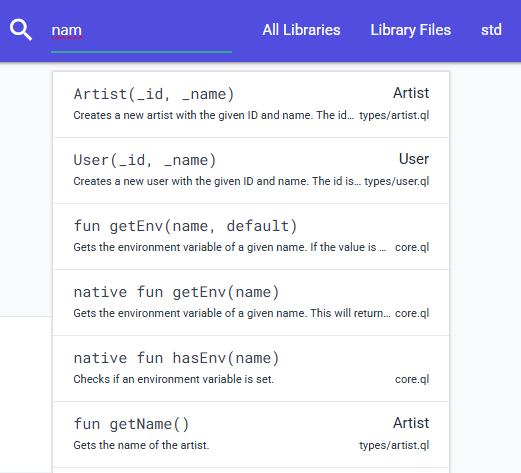
When documentation is generated, an index is generated which allows for fast searching through a packages' documentation. This search is scoped on a per-package basis.
File Tree Navigation
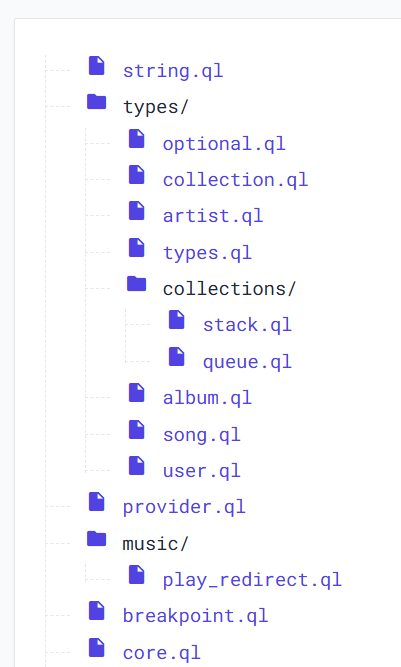
For each package documented, the full tree of files is displayed, allowing for easy navigation and understanding of a whole package's structure. Files can be individually inspected, showing what is defined in it. Likewise, each entity, function, and field are linked to the file of its definition.
Writing Documentation
Docstrings are formatted in a Java-like way. Markdown is supported, with several custom @directives included. A docstring supports the following directives:
/**
 * Some text regarding the [@type boolean] type.
 *
 * @param    x A parameter named `x`
 * @returns  Returns a value
 * @type string
 * @on int
 * @errors Throws an error if `x` is negative
 */
Below is a description, with examples, of each directive. Some directives may be used inline with text, surrounded in []. In these cases, that includes any body of text, such as the main docstring, param description, etc.
@type
A directive that may be used directly on a variable declaration, inline in any description, or applied to @param, @returns and @on. @java may be added before the type name to indicate the type is a fully qualified Java class name.
The following is an example of using @type on a variable declaration:
And some examples of using @type inline:
/**
 * An reference to a [@type @java java.util.concurrent.locks.Lock] may be stored in a [@type java] Qilletni type.
 */
When referencing a non-native Qilletni type, the library name must be specified before the type name:
@param
Describes a parameter of a function or constructor, with an optional type and description. This may be used inline in text to reference a parameter in what's being documented. Below is an example of referencing a parameter, and documenting it:
/**
 * Some documentation talking about the [@param x] parameter.
 *
 * @param x A parameter named x
 */
A type is specified in this directive by writing a type in [] after the directive, before the parameter name, such as
/**
 * @param[@type string]                  x  A parameter named `x` of type `int`
 * @param[@type @java java.util.HashMap] y  A param accepting a Java type
 */
@returns
Specifies the return type of a function. Similar to @param, a type may be spefied.
/**
 * @returns[@type string] Returns a string
 */

/**
 * @returns[@type @java java.util.Map] The returned map
 */
@on
Allows an extension method to describe its target type. This also accepts a type. There is no need to specify a @type directive unless documenting a Java type.
@errors
Describes when the documented function may throw an error, halting the program.